Showing posts with label Learn MQL5. Show all posts

In Metatrader 5 Strategy Tester you can test an Expert Advisor using different currencies, but you can also automatically test a multi-currency EA without the need of switching the currencies as in MT4.

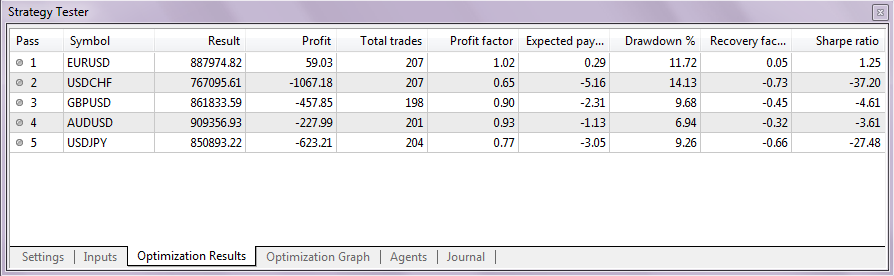
To test a single currency EA using different currencies you must select the option "All Symbols Selected in Market Watch" in the optimization types selection. You can also select the currencies you want to test in the Market Watch window. In my case, i have selected the Heiken Ashi Expert from the example EA's folder using 5 different symbols. The input parameters were standard:

Multi-Currency Strategy Testing with MetaTrader 5

Note that for each tested symbol, around 10-15MB of history will be downloaded, so if you have selected a lot of symbols it may take a while.

In the optimization results you can see which currencies have performed the best. So using the "All Symbols Selected in Market Watch" option you can automatically test an EA on many symbols, without the need to do it manually.

Multi-Currency Strategy Testing with MetaTrader 5

One of the big advantages of the new Metatrader 5 strategy tester is the option to backtest multi-currency EA's. This was not possible in MT4. The testing and optimization process of an multi-currency expert advisor is the same as with other EA's. Metatester 5 will automatically read the code for multiple-symbol testing. The optimization results ad the equity curve will combine all symbols in one result.

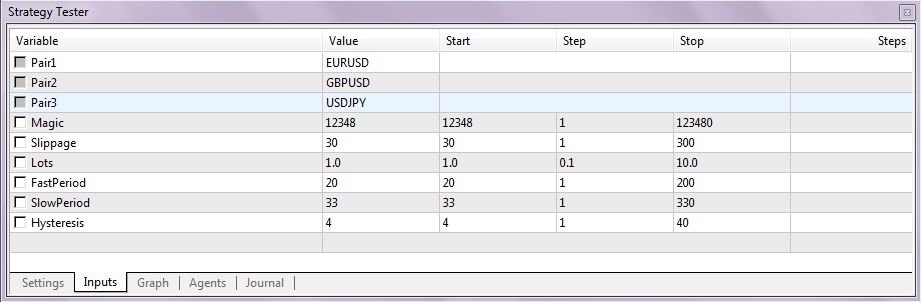
To demonstrate the multi-currency EA testing i have modified the GuruEX03 EA so that it will have 3 currencies. But you can always add more symbols if you want, it's very simple, just copy the code for symbol 4 from previous symbols at the comment "// add more symbols". The EA is a simple moving average crossover trading system. It will enter the market when the slow MA and fast MA are crossed. In the input parameters you can specify all the EA variables. The symbols used in this EA are EURUSD, GBPUSD and USDJPY. You can change them in the line 25-27 of the EA's source code. Download the multi-currency MA crossover EA (.mq5)

Multi-Currency Strategy Testing with MetaTrader 5
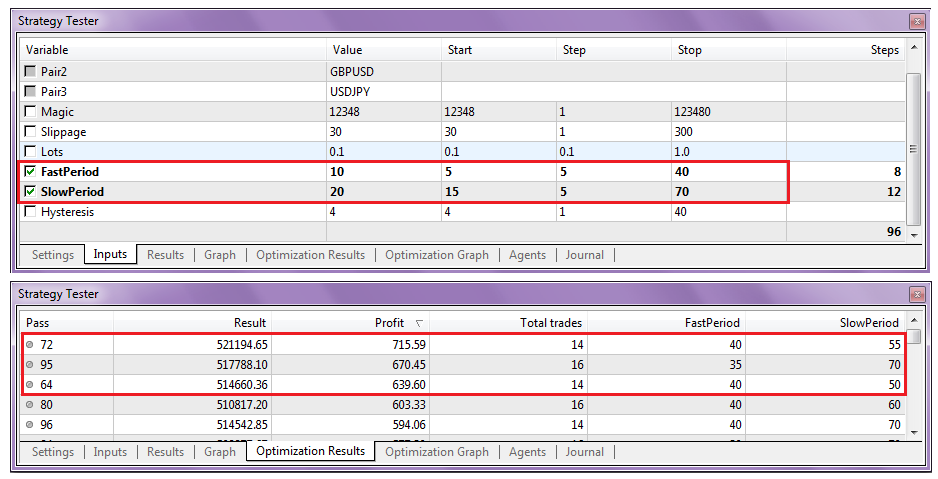
I have done a simple 96 step fast optimization and here are the results:

Multi-Currency Strategy Testing with MetaTrader 5
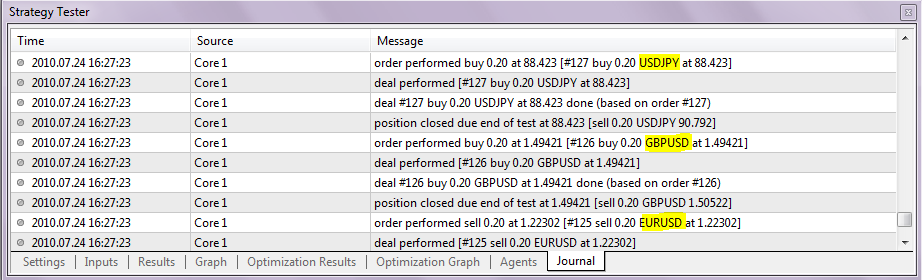
In the log file you can see that the testing process has used all 3 symbols:

Multi-Currency Strategy Testing with MetaTrader 5

mql5 magazine logo
Check out this great blog about MQL programming and Metatrader 5 related stuff: http://mqlmagazine.com The authors of the blog are Bogdan Caramalac and Bogdan Baltatu, professional traders and MQL programmers from Romania. The blog has many great articles, for example: Tick events in MQL5: complicated for now, but functional or Quoting – A new activity in MT5

About their blog:

MQLmagazine.com is a web magazine for MetaTrader users and MQL programmers, covering automated trading in forex, futures, options and equities.

Metatrader 5 – A Probably New Beginning For Everything

This was the title of my last post in my former blog on the vamist.ro website – the romanian forex community. At that time I was announcing my decision to move my blog on a brand new domain – my own. However, things changed and there had come the decision to write a magazine. But what kind of magazine ? Well, there are plenty magazines for traders. Take a look at the ones better known – CurrencyTrader , Futures & Options Trader… They target most of the time the strategical type of trader. The one that takes long term trades that span on months. This is why most of their analysis are floating around market forecasts. Of course, around these, different platform commercials and explanations of “forex” terms.

The retail forex market is around for some good years. In the so-called “western world”, these markets became known and called for retail traders right from beginning. But here, in Romania, where the authors are located, forex is still not too much known. However, we will not make a forex magazine. As I said, forex was what was offered to beginners at that time.

Things have started to change a bit a few years ago, when forward steps have been made by several brokerages, that started to offer futures and equities under MetaQuotes’ most acclaimed platform, Metatrader 4. But it wasn’t the time of a revolution in retail trading. Because Metatrader 4 was not designed – although it is the best retail trading platform – to trade the manner professional traders think and do it. Therefore, several trading strategies that were known to professional traders and , in general, to the hedge fund world, have remain hidden from the sight of retail traders.

Even more, brokerages commercials and forums accentuated the traders indoctrination that forex was the ultimate market that could have been traded. Lots of trading strategies and markets were hidden : pair trading strategies, quoting, forex arbitrage (although it was tackled at that time by a few, including myself) , forex / futures arbitrage, commodities arbitrage, and finally option strategies. Option strategies still are, at this time, the realm of derivatives quants. Even professional option traders don’t trade the way they might think – because either the platforms can’t do it and the NFA regulations restrict it. Here are some facts about trading platforms and regulations:

- most of them do not have a backtesting module;
- most of them do not support even exchange traded options, not speaking about exotics;
- most of them do not offer automation for options, and that including the well-known TradeStation and OptionStation;
- option stations may not support any other assets – example RAN Order and IKON.
- the ones that have a backtesting module may not backtest multiple assets;
- data feed is dependant on either broker or data provider; so you may have, or not, what you desire to trade;
- they might offer their own scripting language or API ; professional platforms might offer only FIX specification and leave automation on the hands of extremely skilled C++ programmers;
- under NFA regulations you cannot trade in a forex account anything else besides forex, gold and silver. Anything else, including forex options or real futures, trade in a separate account;
- under NFA regulations you cannot trade CFDs (broker manufactured assets that mimic real market, being tailored to small investors);
- under NFA regulations you can trade futures, equities, and options in the same account;
- and finally, under NFA regulations, you cannot hedge – that is, you cannot be long and short at the same time on an instrument ; even more, positions open and close in a FIFO manner.

Unfortunately, Metatrader 4 didn’t score too much either ; a limited platform, extremely latent , which can’t backtest anything but strategies trading one asset and with no implementation of options. As a result, anything quite constructive that could have been built in theoretical conditions (i.e. textbook strategies) could not be backtested or not even implemented at all.

But with the emergence of the new MetaQuotes’ flagship platform, Metatrader 5, things have started to change. At the time this article is being written, Metatrader 5 is in open beta. The “Strategy Tester” module (which is well known by some of our readers and will be also presented in future articles) is not present in the platform. It is our belief that the Strategy Tester will allow development of multiasset strategies. Multiasset backtesting is needed in a lot of situations. I might even say that all successful trading is multiasset trading. You might ask why. And the answer is simple. All [successful] trading is a form of arbitrage. Some will argue and say that very good trading systems don’t arbitrage – but when you look at a sheet with trades and see a good percentage of profitable trades that are not offset by bad trades, somehow the system knew to buy something cheap and sell something expensive, so it does nothing else than a price-value arbitrage. But one-asset markets are just too random for the unexperienced trader to handle. After all, what is of value is the multiasset approach, because markets can’t be too efficient overall. Correlations are broken, parity relations are broken, add to this the magic of options, and look at the big picture : markets become full of opportunities! Now don’t ask why they got into the crysis : they had too much money, way too much money in order to make enough using opportunities. After all, we’re not interested in universal strategies that apply to everyone. But in strategies that apply to US, THE SMALL GUYS.

So, given that the new Metatrader 5 comes with new features, like multiasset backtester, option trading and event-based programming, we decided it was time for a magazine for all things MetaTrader. Of course, with the accent on MQL programming. The magazine will be addressed to all categories of MetaTrader users: absolute beginners that never heard of trading and are making the first steps in the world of markets, MetaTrader traders that use the terminal , and finally all categories of MQL programmers – task specific programming and also complex strategies design and programming.
Source: Mqlmagazine.com

Some time ago, Paul (phampton) wrote on his blog about the creation of extended documentation for the MQL5 code using some free tools like Doxygen and HTML Help. This extended documentation in the form of a a compiled HTML help file, includes class hierarchies and methods for all the code distributed under the MQL5 folder, like the MQL 5 indicators or the MQH include files.

Each MQL5 file has a reference list with all functions and variables and everything is cross-linked. There is also an alphabetical index for it. This way it can help you a lot to learn the new Metatrader 5 MQL5 programming language. You can also add custom made indicators and other MQL5 files to the documentation. Below are some screenshots illustrating the documentation file:

mql5 metatrader 5 extended documentation

mql5 metatrader 5 extended documentation

mql5 metatrader 5 extended documentation

mql5 metatrader 5 extended documentation

Paul has already compiled the documentation file, and you can download it here.
If you want to learn how you can create such a documentation file yourself, read the post on Paul's Blog.

mql5 website
The website mql5.com is now online! ;) The forum , mql5 documentation and articles section are already working, but the code base is still in development. Great news for all MQL5 developers: a MQL5 book is planned and it will be written by Sergey Kovalyov, author of the MQL4 book.

Now that the MQL5 documentation is online, you don't need a local version of the MQL5 help. The MQL5 language continues developing and the official documentation will be extended and improved, so the online version will contain always the last updates. So if you plan to learn MQL5, the mql5 documentation is the best place to start!

All forum accounts were moved from the MQL4 website, so you can use your existing login, you should only fill your profile and upload an avatar if you use one.

Some information about the migration from MQL4 to MQL5:

MQL5 is the development of its predecessor - the MQL4 language, in which numerous indicators, scripts, and Expert Advisors were written. Despite the fact that the new programming language is maximally compatible with the previous-generation language, there are still some differences between these languages. And when transferring programs these differences should be noted.

Information intended to facilitate the adaptation of codes to the new MQL5 language for programmers who know MQL4:

First it should be noted:

• The new language does not contain functions start(), init() and deinit();
• The number of indicator buffers is not limited;
• dll is downloaded immediately after downloading an Expert Advisor (or any other mql5 program);
• Check of logical conditions is shortened;
• When limits of an array are exceeded, the current performance is terminated (critically - with the output of an errors);
• Precedence of operators like in C + +;
• The language offers the implicit type cast (even from string to a number);
• Local variables are not initialized automatically (except for strings);
• Common local arrays are automatically deleted.

Special Functions init, start and deinit
The MQL4 language contained only three predefined functions that could be used in the indicator, script or Expert Advisor (not taking into account the include files *.mqh and library files). In MQL5 there are no such functions, but there are their analogues. The table shows the approximate correspondence of functions.

metatrader 5 - mql5

Functions OnInit and OnDeinit perform the same role as init and deinit in MQL4 - they are designed to locate the code, which must be performed during initialization and deinitialization of mql5 programs. You can either just rename these functions accordingly, or leave them as they are, but add calls of these functions in corresponding places. The start function is replaced by OnStart only in scripts. In Expert Advisors and indicators it should be renamed to OnTick and OnCalculate, respectively.

Example:

void OnInit()
{
//--- Functions is called to initialize
init();
}
void OnDeinit(const int reason)
{
//--- Call the function with deinitialization
deinit();
//---
}
If the indicator or script code does not contain the main function, or the function name differs from the required one, the call of this function is not performed. It means, if the source code of a script doesn't contain OnStart, such a code will be compiled as an Expert Advisor. If an indicator code doesn't contain the OnCalculate function, the compilation of such an indicator is impossible.

Predefined Variables
In MQL5 there are no such predefined variables as Ask, Bid, Bars. Variables Point and Digits have a slightly different spelling.

metatrader 5 - mql5

Access to Timeseries
In MQL5 there are no such predefined timeseries as Open [], High [], Low [], Close [], Volume [] and Time []. The necessary depth of a timeseries can now be set using corresponding functions to access timeseries.

Expert Advisors
Expert Advisors in MQL5 do not require the obligatory presence of the function for handling the events of a new tick receipt - OnTick, as it was in MQL4 (the start function in MQL4 is executed when you receive a new tick), because in MQL5 Expert Advisors can contain pre-defined handler functions are several types of events:

• OnTick – receipt of a new tick;
• OnTimer – timer event;
• OnChartEvent – events of input from the keyboard and mouse, events of a graphic object moving, event of a text editing completion in the entry field of the LabelEdit object;
• OnBookEvent – event of Depth of Market status change.

Custom Indicators

In MQL4, the number of indicator buffers is limited and can't exceed 8. In MQL5 there are no such limitations, but it should be remembered that each indicator buffer requires allocation of a certain part of memory for its location in the terminal, so the new possibility should not be abused.
MQL4 offered only 6 types of custom indicator plotting; while MQL5 now offers 18 drawing styles. The names of drawing types haven't changed, but the ideology of the graphical representation of indicators has changed significantly.
The direction of indexing in indicator buffers also differs. By default, in MQL5 all the indicator buffers have the behavior of common arrays, i.e. 0 indexed element is the oldest one in the history, and as the index increases, we move from the oldest data to the most recent ones.
The only function for working with custom indicators that was preserved from MQL4 is SetIndexBuffer. But its call has changed; now you should specify type of data to be stored in an array, linked to the indicator buffer.
Properties of custom indicators also have changed and expanded. New functions for accessing timeseries have been added, so the total calculation algorithm must be reconsidered.

Graphical Objects
The number of graphical objects in has increased significantly MQL5. But now there is a limitation - functions for working with graphical objects can't be used in custom indicators.
Besides, graphical objects can now be positioned in time with the accuracy of a second in a chart of any timeframe - now object anchor points are not rounded off to the bar opening time in the current price chart.
For objects Arrow, Text and Label now way of binding can be indicated, and for Label, Button, Chart, Bitmap Label and Edit chart corner, to which the object is anchored, can be set.

Source: MQL5 Reference

metatrader 5


A new article about custom indicators in Metatrader 5 was posted today on the mql4.com website. It explains the MQL5 indicators, their structure, drawing, types and their programming details, comparing to MQL4. Also, 7 new custom indicators were presented with the article.

Read

A script which converts MQL 4 code to MQL 5 code was developed by Keiji and Circlesquares on the MQL4 forum.

First, download the following files and place them in your Metatrader 4 / experts / include folder

- mt4accountinfo.mqh
- mt4string.mqh
- mt4datetime.mqh
- mt4objects_1.mqh ( updated version ), see post below.
- mt4timeseries_2.mqh ( updated version ), see post below.

Rewrite MQL 4 to MQL 5 Script

Now, download the latest version of the rewrite script and place it in your Metatrader 4 / experts / scripts folder:

- mq4to5rewrite_sample_v4_2.mq4

After that you will need to place a mql4 indicator, script or ea which you want to convert to MQL 5 in your Metatrader 4 / experts / files folder. Now open Metatrader 4 and run the script. As you can see you must first provide the name (without extension) of your mq4 file and select if it is an indicator (0), EA (2) or script (3) file.

Rewrite MQL 4 to MQL 5 Script

In my case i'm rewritting a MQL4 indicator named ang_DCT:

Rewrite MQL 4 to MQL 5 Script

Now hit the "OK" button and if everything is done, the following message will appear:

Rewrite MQL 4 to MQL 5 Script

After that go to your Metatrader 4 / experts / files folder and you will find the converted mq5 file there:

Rewrite MQL 4 to MQL 5 Script

Now open this file with Metaeditor 5 in compile it:

Rewrite MQL 4 to MQL 5 Script

Try to fix the errors with the MQL4 to MQL5 Porting Table and the last version of the translated MQL5 user guide.

FraMa Cross Indicator and EA (author - Paul, see his blog Paul's Forex random walk)

This indicator will show a fast and slow Fractal Moving Average (FRAMA) and places arrows at the open of each bar following an MA cross event. FRAMA is an exponential style moving average and can be a valuable technical indicator because it rapidly follows significant changes in price but becomes very flat in congestion zones so that bad whipsaw trades can be eliminated. The FRAMA is an alternative indicator to the default fractals that is included with the Metatrader 5 installation. Read more about the background of FRAMA here.

FraMa Cross for Metatrader 5

FraMa Cross for Metatrader 5

You can customize the fast and slow MA period. The EA is triggered using the indicator. Because the strategy tester is not available yet, the EA can not be tested for it's effectiveness.

Paul also wrote a useful MQH include file which converts error codes and OrderSend results to strings and a debugging file.

Go to Paul's blog and download

Fai has posted today a handy table with a comparison of the MQL4 and MQL5 functions ( MQL4 to MQL5 Porting Table ). It will help a lot with learning of the new MQL5 language.

MQL4 to MQL5 Porting Table

Download

See also: MQL 5 User Guide

Today we are going to create a simple script for Metatrader 5 that will instantly delete all objects on the active chart window. If you are experimenting with graphical objects or if you are using indicators that do not redraw graphical objects automatically, the script will save your time.

First, open MetaEditor 5 and press the "New" button. The MQL5 Wizard will start up. Select "Script" and press "Next":

Delete all Objects Script for Metatrader 5

Now give a name to your script and fill your copyright information - author and website, then press "Next":

Delete all Objects Script for Metatrader 5

A window with the code for your script will appear. Our script is probably the easiest one, because it contains only one line of code. Add this line of code as shown on the picture:


ObjectsDeleteAll(0);
//---


Now press the "Compile" button and make sure that no errors appear in the debugging window below:

Delete all Objects Script for Metatrader 5

The script is saved in your Scripts folder. Now open Metatrader 5 terminal and add some graphical objects to the chart. Now open the navigator window, select your script and drag it to the chart window. All graphical objects will instantly disappear. It's much faster than doing it by hand, isn't it?

Delete all Objects Script for Metatrader 5

As you can read in the MQL5 reference guide, the ObjectsDeleteAll function removes all objects from the specified chart. You can also specify such variables as chart id, type of object that will be removed, etc. In our case "0" means the current chart. If you want to learn more about this function, search for "ObjectsDeleteAll" in the MQL5 reference guide.

metatrader 5 user guide

Here are the user guides for MetaTrader 5, MetaEditor 5 and MQL5. You can find there many useful information regarding all features and possibilities of the new MT5 Platform. Topics like user interface, working with charts, analytics, market watch and trading, etc. are covered. It is now the best source of documentation to read. ;)

The MQL 5 User guide is not yet available in English so it was translated via Google Translate.

You can find the MetaTrader 5 and MetaEditor 5 user guides in your \MetaTrader 5\Help\ folder. But if you didn't install the MT5 beta, you can download the user guides below.

Download:

MQL 5 User Guide

Metatrader 5 Terminal User Guide

Metaeditor 5 User Guide

Here i will post all information about the MQL5 documentation and tutorials. This post will be regularly updated with links to new content.


- Moving from MQL4 to MQL5t
- Rewrite MQL 4 to MQL 5 Script
- MQL4 to MQL5 Porting Table
- MT5, Metaeditor 5 and MQL5 User guides
- Learning programming for the Metatrader 5 platform
- MQL5: No graphical objects in indicators
- Review of the Metatrader 5 Beta
- MetaTrader 5 Trading System
- Metatrader 5 development environment: MQL4 vs MQL5
- MetaTrader 5 Client Terminal - first screenshots and information
- Interview with Stanislav Starikov, leading programmer of MQL5 about the development of MQL5
- Suggestions for Metatrader 5 and MQL5
- Metatrader 5 and MQL 5 Development - questions and answers