In Metatrader 5 Strategy Tester you can test an Expert Advisor using different currencies, but you can also automatically test a multi-currency EA without the need of switching the currencies as in MT4.
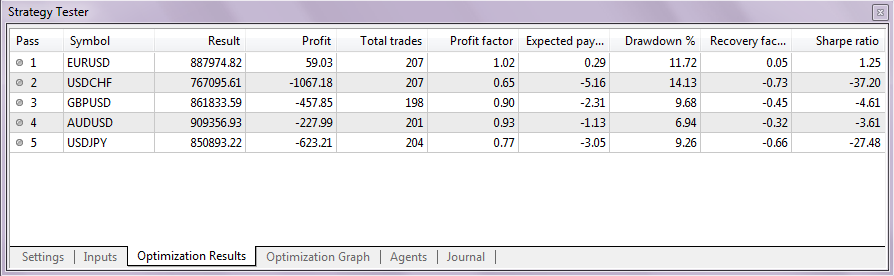
To test a single currency EA using different currencies you must select the option "All Symbols Selected in Market Watch" in the optimization types selection. You can also select the currencies you want to test in the Market Watch window. In my case, i have selected the Heiken Ashi Expert from the example EA's folder using 5 different symbols. The input parameters were standard:

Note that for each tested symbol, around 10-15MB of history will be downloaded, so if you have selected a lot of symbols it may take a while.
In the optimization results you can see which currencies have performed the best. So using the "All Symbols Selected in Market Watch" option you can automatically test an EA on many symbols, without the need to do it manually.

One of the big advantages of the new Metatrader 5 strategy tester is the option to backtest multi-currency EA's. This was not possible in MT4. The testing and optimization process of an multi-currency expert advisor is the same as with other EA's. Metatester 5 will automatically read the code for multiple-symbol testing. The optimization results ad the equity curve will combine all symbols in one result.
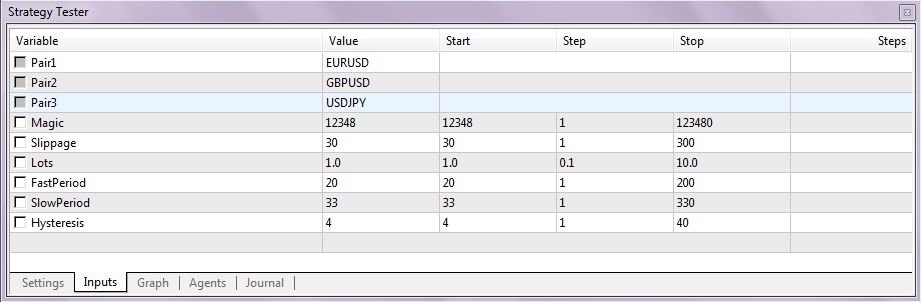
To demonstrate the multi-currency EA testing i have modified the GuruEX03 EA so that it will have 3 currencies. But you can always add more symbols if you want, it's very simple, just copy the code for symbol 4 from previous symbols at the comment "// add more symbols". The EA is a simple moving average crossover trading system. It will enter the market when the slow MA and fast MA are crossed. In the input parameters you can specify all the EA variables. The symbols used in this EA are EURUSD, GBPUSD and USDJPY. You can change them in the line 25-27 of the EA's source code. Download the multi-currency MA crossover EA (.mq5)

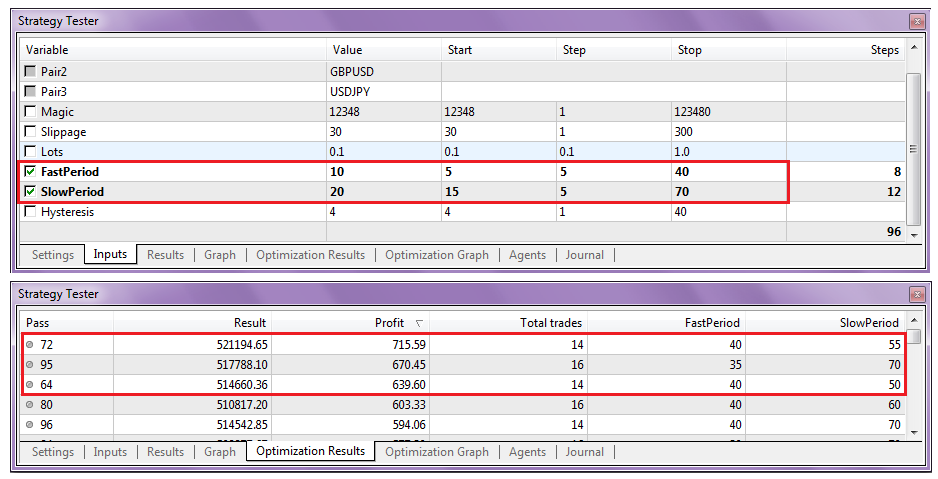
I have done a simple 96 step fast optimization and here are the results:

In the log file you can see that the testing process has used all 3 symbols:

To test a single currency EA using different currencies you must select the option "All Symbols Selected in Market Watch" in the optimization types selection. You can also select the currencies you want to test in the Market Watch window. In my case, i have selected the Heiken Ashi Expert from the example EA's folder using 5 different symbols. The input parameters were standard:

Note that for each tested symbol, around 10-15MB of history will be downloaded, so if you have selected a lot of symbols it may take a while.
In the optimization results you can see which currencies have performed the best. So using the "All Symbols Selected in Market Watch" option you can automatically test an EA on many symbols, without the need to do it manually.
One of the big advantages of the new Metatrader 5 strategy tester is the option to backtest multi-currency EA's. This was not possible in MT4. The testing and optimization process of an multi-currency expert advisor is the same as with other EA's. Metatester 5 will automatically read the code for multiple-symbol testing. The optimization results ad the equity curve will combine all symbols in one result.
To demonstrate the multi-currency EA testing i have modified the GuruEX03 EA so that it will have 3 currencies. But you can always add more symbols if you want, it's very simple, just copy the code for symbol 4 from previous symbols at the comment "// add more symbols". The EA is a simple moving average crossover trading system. It will enter the market when the slow MA and fast MA are crossed. In the input parameters you can specify all the EA variables. The symbols used in this EA are EURUSD, GBPUSD and USDJPY. You can change them in the line 25-27 of the EA's source code. Download the multi-currency MA crossover EA (.mq5)
I have done a simple 96 step fast optimization and here are the results:
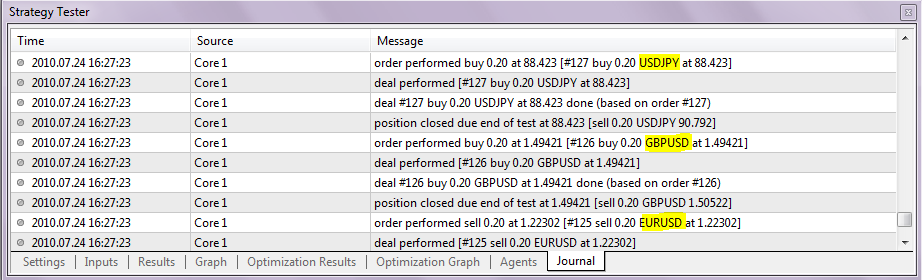
In the log file you can see that the testing process has used all 3 symbols: