Showing posts with label Indicators for MT5. Show all posts

Fractals Period for Metatrader 5 (author - Alexander Piechotta, see original post here)

The Fractals indicator is one of the five indicators of Bill Williams’ trading system, which allows you to detect the bottom or the top of the current trend. However, the main drawback with fractals is that they are lagging indicators because a fractal can't be drawn until the bars have appeared. Thats why fractals are best used in combination with other indicators like the popular "Alligator indicator". This Fractals Period indicator allows you to specify the number of bars separately before and after the current High / Low. As you can see on the screenshot below, the fractals are indicated with the up and down arrows.

Metatrader 5 FractalsPeriod indicator

You can customize the following input parameters:

CompleteBarsOnly - Converts only with finished bars
FractalsPeriodBefore - Number of bars before the current High / Low
FractalsPeriodAfter - Number of bars after the current High / Low
Maxbar - max. Number of bars in the calculation.

The indicator uses the CalcFrac Class (calculate fractals by array values), so place the file "CalcFrac.mqh" in the \MetaTrader 5\MQL5\Include\ folder

Download the indicator
Download CalcFrac.mqh


And some new indicators from Andrei @ Earn Forex Blog:

Aroon indicator for Metatrader 5

Aroon is a technical indicator, very similar to the directional movement index (DMI) which measures the strength of a given trend. It us used for identifying trends and the likelihood that the trends will reverse. It can help you to detect the local tops and bottoms on the chart. The Aroon indicator reports the time it's taking for the price to reach, from a custom starting point, the highest and lowest points over a given time period, each reported as a percentage of total time. You can specify the Aroon Period in the input parameters of the indicator. Read more about Aroon here.

Aroon indicator for Metatrader 5

Download ( see original post here )


CCI Arrows for Metatrader 5

A simple indicator that will show you where the CCI (Commodity Channel Index, a momentum oscillators) cross with the zero occur. CCI can be used to identify overbought and oversold levels and is also valuable for identifying reversals. However, it should not be used as a signal indicator, but only for technical analysis to confirm the current trend. The CCI cross is marked with arrows. You can specify the CCI Period in the input parameters of the indicator.

CCI Arrows for Metatrader 5

Download ( see original post here )


Easy Trend Visualizer for Metatrader 5

This indicator is based on the ADX (Average Direction Movement Index), which measures the strength of a trend and can be used to determine if a trend is strong or weak. High readings indicate a strong trend and low readings indicate a weak trend. It is not a signal indicator, it only tells you how strong the current trend is. So use it as a part of you trading system.

In the input parameters you can specify the 3 ADX parameters ( from faster to slower) and the colors of the bars.

Easy Trend Visualizer for Metatrader 5


Download
( see original post here )

8 new indicators for Metatrader 5:

1. Trading Sessions ( author - vdv2001 )

This is the MQL5 version of the popular indicator that draws a vertical lines seperating the different trading session times. It shows the main 3 trading sessions. There are no input parameters because of the functions TimeTradeServer(), TimeGMT() which gets the time updates automatically. You can customize the colors.

metatrader 5 indicator

Download

2. Color RSI ( author - TheXpert )

RSI - Relative Strength Index Indicator - is a great momentum indicator which compares the average of up and down closes for a specific period of time. You can customize the RSI period and Smooth period and the 4 colors of the lines. The standard RSI value is 14 periods and it can be applied to any time frame. Like with the stochastic indicator, when the RSI is peaking above the 70 level, the market is overbought and when it's exiting the 70 level, downtrend is underway. Read more about trading with RSI here

metatrader 5 indicator

Download

3. Cross MA ( author - TheXpert )

This indicator draws a fast and a slow moving average and fills the space between them with color. Moving averages are one of the most popular and easy to use indicators available for technical analysis and are used to define areas of possible support and resistance and measure the momentum. You can customize the value of Slow/Fast MA and their color.

metatrader 5 indicator

Download

4. Color MACD with MA lines ( author - Ray_dl from Forex-TSD, originally posted here )

A great indicator which consists of Color MACD and 2 MA lines. You can customize all settings.

metatrader 5 indicator

metatrader 5 indicator

Version with 2 colors: Download
Version with 4 colors: Download

5. Price Alert ( author - Andrei, see original post here)

A great tool which can alert you when a certain price level is met. You can get a sound alert ( you can turn it off ) and a e-mail alert! You can use it whenever you wish to be notified of new price levels.

metatrader 5 indicator

Download

6. Histogram Indicator or Fisher indicator for Metatrader 5 ( author - Andrei, see original post here)

This is a version of the the Fisher Transform indicator which was devised John Ehlers.

It calculates the maximum and minimum price levels from the previous periods and detects direction and strength of the trend and based on this signals trend changes. It can be used as the main trend indicator of a trading system, like a signal indicator: If it is above the zero line you have a buy signal and if it's below the zero line you can look for sell signals. In the input parameters you can specify the period in bars on which the maximum and minimum will be calculated. Read more about the Fisher indicator here.

metatrader 5 indicator

Download

7. VarMovAvg ( author - Andrei, see original post here)

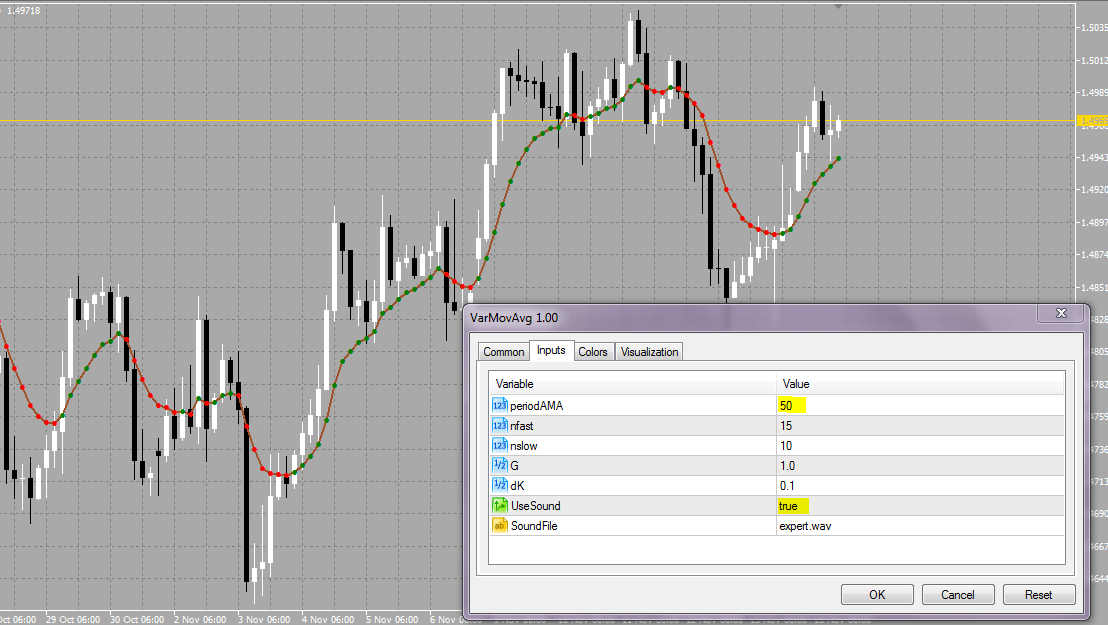
This indicator is based on the moving average and can be used for detecting trends. You can customize many options and you can also set a sound alert. periodAMA is the MA period, nfast and nslow are noise filters to filter out spikes, G - smoothing setting. You can also customize the colors.

metatrader 5 indicator

Download

8. Trend Strength - Laguerre ( author - Andrei, see original post here)

This is the Metatrader 5 version of the popular Laguerre indicator. Laguerre reacts rapidly to price changes and can be used as a signal indicator or as an important component of a trading system. It's using only a few data samples so the indicator can be made to be much more responsive to recent price data. More responsiveness translates to faster reaction times in placing the trades and, consequently, improved profitability due to the reduction in signal lag. It works like a RSI indicator, so buy or sell when certain levels are crossed. Read more about Laguerre here.

You can customize the following input parameters: CountBars - amount of bars based on which the indicator performs calculations. The higher the better. Gamma - smoothing value.

metatrader 5 indicator


Download

metatrader 5


A new article about custom indicators in Metatrader 5 was posted today on the mql4.com website. It explains the MQL5 indicators, their structure, drawing, types and their programming details, comparing to MQL4. Also, 7 new custom indicators were presented with the article.

Read

A script which converts MQL 4 code to MQL 5 code was developed by Keiji and Circlesquares on the MQL4 forum.

First, download the following files and place them in your Metatrader 4 / experts / include folder

- mt4accountinfo.mqh
- mt4string.mqh
- mt4datetime.mqh
- mt4objects_1.mqh ( updated version ), see post below.
- mt4timeseries_2.mqh ( updated version ), see post below.

Rewrite MQL 4 to MQL 5 Script

Now, download the latest version of the rewrite script and place it in your Metatrader 4 / experts / scripts folder:

- mq4to5rewrite_sample_v4_2.mq4

After that you will need to place a mql4 indicator, script or ea which you want to convert to MQL 5 in your Metatrader 4 / experts / files folder. Now open Metatrader 4 and run the script. As you can see you must first provide the name (without extension) of your mq4 file and select if it is an indicator (0), EA (2) or script (3) file.

Rewrite MQL 4 to MQL 5 Script

In my case i'm rewritting a MQL4 indicator named ang_DCT:

Rewrite MQL 4 to MQL 5 Script

Now hit the "OK" button and if everything is done, the following message will appear:

Rewrite MQL 4 to MQL 5 Script

After that go to your Metatrader 4 / experts / files folder and you will find the converted mq5 file there:

Rewrite MQL 4 to MQL 5 Script

Now open this file with Metaeditor 5 in compile it:

Rewrite MQL 4 to MQL 5 Script

Try to fix the errors with the MQL4 to MQL5 Porting Table and the last version of the translated MQL5 user guide.

FraMa Cross Indicator and EA (author - Paul, see his blog Paul's Forex random walk)

This indicator will show a fast and slow Fractal Moving Average (FRAMA) and places arrows at the open of each bar following an MA cross event. FRAMA is an exponential style moving average and can be a valuable technical indicator because it rapidly follows significant changes in price but becomes very flat in congestion zones so that bad whipsaw trades can be eliminated. The FRAMA is an alternative indicator to the default fractals that is included with the Metatrader 5 installation. Read more about the background of FRAMA here.

FraMa Cross for Metatrader 5

FraMa Cross for Metatrader 5

You can customize the fast and slow MA period. The EA is triggered using the indicator. Because the strategy tester is not available yet, the EA can not be tested for it's effectiveness.

Paul also wrote a useful MQH include file which converts error codes and OrderSend results to strings and a debugging file.

Go to Paul's blog and download

Another 2 new indicators for Metatrader 5:

1. Bma Indicator ( author - Andrei, see original post here)

metatrader 5 bma indicator

BMA (Bands Moving Average) is a modified moving average indicator that comes with Metatrader 5, with 2 more bands added to it. One band is below the main line by 2% and the other — above by 2%. This indicator can be used as the pull-back detector: when the price breaks through the upper band on the long-term bearish trend — it’s a signal to sell and when the price break through the lower band on the long-term bullish trend — it’s a signal to buy. So the BMA indicator can be helpful in identifying overbought or oversold conditions on the market, however, it's probably best to make decisions on whether to buy or sell using moving average bands in conjunction with other technical analysis indicators rather than on their own. I personally wouldn't use it as a signal indicator. Remember, moving averages are a "lagging" indicator. The longer the MA's length, the longer it takes for that moving average to react to severe price swings, such as gaps. Thats why it often works better on smaller timeframes like H1 and below, so using it as a scalping method is a good idea.

As you can see in the picture above, you can change some properties of this indicator like the MA period and the % of shift, in our case it is 2%, but you can off course experiment with other settings.

Download


2. Double smoothed stochastic indicator (author - mladen, originally posted here)

metatrader 5 double smoothed stochastic indicator

This is a modification of the standard stochastic oscillator. As you know, stochastic identifies overbought and oversold conditions on the market, helping to buy low or sell high. It also helps to avoid buying at high prices or shorting at low prices. However, it does not work well on trends! So it should be only used as part of the trading strategy not as signal indicator. Better use MACD for signals. ( This is only my personal opinion based on my trading experience ;) ).

You can change the stochastic period, smoothing period and overbought/oversold levels.

Download

More new indicators for Metatrader 5 have been posted recently:

1. Market Profile Virgin POC, Enthios Universal System (author - vdv2001)

This indicator is based on the Enthios universal system. The system is based on trading the bounces from areas of strong support/resistance which is described in detail here.

Enthios Universal for Metatrader 5

You can customize some properties, i have added translation:

Enthios Universal for Metatrader 5

Download
(Indicator is posted here)


2. Color MACD (author - Mladen)

MACD stands for Moving Average Convergence / Divergence and shows the difference between a fast and slow exponential moving average (EMA) of closing prices. MACD is a very popular technical analysis indicator that is used in many trading strategies (including mine :) ). The standard MACD indicator in Metatrader 5 has only 1 color, this one has 4 which you can customize as you want.

Color MACD for Metatrader 5

Download
(Indicator was originally posted here)


3. Tape MACD (author - Mladen)

This is a "tape like" MACD. The difference between the MACD and the signal line is plotted as a tape instead of plotting two separate lines. You can customize the MACD variables and the colors.

Tape MACD for Metatrader 5

Download
(Indicator was originally posted here)

A few days ago some traders posted first indicators and scripts for the Metatrader 5 platform written in the new MQL5 language. Two of them are really impressive and show the real power and new possibilities of MQL5.

1. Slideshow indicator for Metatrader 5 (by Rosh)

This indicator will place custom background pictures behind the chart and rotate them every xx seconds. So now you can create your favorite theme background that maybe will help you to relax during intensive trading sessions. ;)

Slideshow indicator for Metatrader 5

Indicator properties that you can change:

name1 = "Tetris\\1.bmp"; // path to the file and name of the picture for the background;
name2 = "Tetris\\2.bmp"; // same for picture 2;
...
seconds = 2; // time between rotation.

Download the indicator
View the MQL5 source code


2. TradePad indicator for Metatrader 5 (by satop)

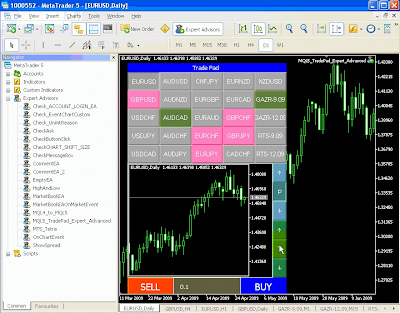
With this indicator you can add a panel with various custom mini charts and trade buttons / lot options. I think this indicator is ideal for scalping techniques or quick overview of the markets situation.

TradePad indicator for Metatrader 5

View a video with this indicator in action: link

Download the indicator
View the MQL5 source code

+ place the following files in the /MQL5/Experts folder:

- ClassChart.mqh
- ClassControlButton.mqh
- ClassSymbolButton.mqh
- ClassTradePad.mqh

To see other indicators and scripts for Metatrader 5, please visit: MT5 Codebase

Here i will post all information about Metatrader 5 indicators, scripts and EA's. This post will be regularly updated with links to new content. In the future, i will sort the indicators, scripts and EA's to apart categories.


- MT 5 Indicator Update
- 8 new indicators for Metatrader 5
- Rewrite MQL 4 to MQL 5 Script
- FraMa Cross Indicator and EA for MT5
- Bma and Double Smoothed Stoch Indicators for MT5
- Prev-Next Timeframe Script for MT5
- More indicators for Metatrader 5
- Delete all Objects Script for MT5
- Close All Expert for MT5
- First Metatrader 5 Indicators